
A Cache Hit Is Not Fresh Data: Keep Source Dates Separate from HTTP Dates
A dashboard loads instantly. The request returns 200 OK. The cache reports a hit. Under the number, a badge says “Updated just now.”
That badge might be describing a page render while the underlying observation is three days old. The request succeeded; the explanation failed.
For small data products, fixing this does not require a new streaming pipeline. It starts with deciding which clock each field describes—and refusing to manufacture a timestamp when the source provides only a date.
Three clocks, three different claims
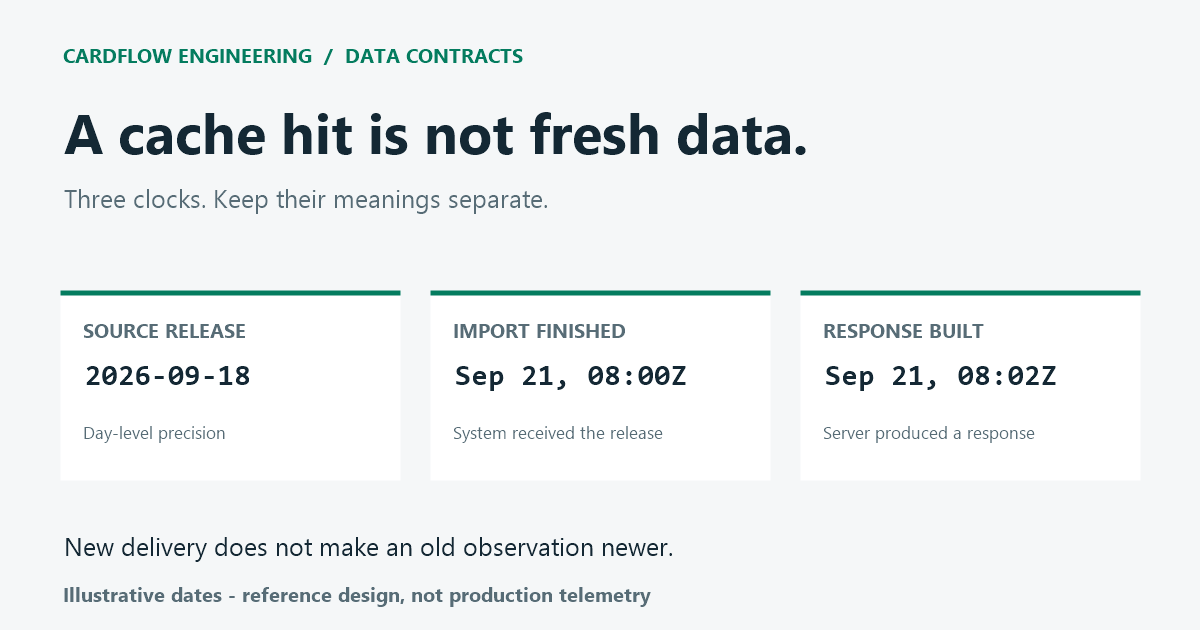
Consider a fictional dataset with these events:
| Event | Time supplied by the system | What it tells the reader |
|---|---|---|
| Source labels its release | 2026-09-18 |
The release has day-level precision |
| Import finishes | 2026-09-21T08:00:00Z |
This system received the release on September 21 |
| Response is generated | 2026-09-21T08:02:00Z |
The server produced a response at that instant |
None of the later events makes the source release newer. In particular, a successful import can deliver the same old dataset again.
HTTP has its own freshness model. A cache decides whether it may reuse a response; that is a transport question. The Age header estimates response-message age, rather than the age of an observation inside the payload. RFC 9111 defines that distinction at the response layer. A short cache lifetime can coexist with an old source release.
Preserve the precision you actually received
Avoid a single updatedAt field that changes meaning between endpoints. A compact application contract could look like this:
{
  "source": {
    "releaseDate": "2026-09-18",
    "precision": "day",
    "timeZone": null
  },
  "ingestedAt": "2026-09-21T08:00:00Z",
  "snapshotId": "example-release-17"
}
These are invented fields and values for a reference design, not a description of a production API.
The null time zone is deliberate: this fictional source has not supplied one. Do not quietly turn its date into midnight UTC and then display an exact age in hours. JavaScript will accept a date-only ISO string and interpret it as UTC, as the Date.parse documentation explains. That parser convention does not prove what the publisher meant.
If the source provides a real observation timestamp with a documented offset, store that separately. If it provides no date at all, represent that as unknown. Neither situation should fall back to the current time.
A small formatter with an explicit failure state
This function formats a validated calendar date. It does not calculate data age or decide whether a dataset is current enough for a particular use.
function sourceDateLabel(value) {
  if (typeof value !== "string" ||
      !/^\d{4}-\d{2}-\d{2}$/.test(value)) {
    return "Source date unavailable";
  }

  const ms = Date.parse(`${value}T00:00:00.000Z`);
  if (!Number.isFinite(ms) ||
      new Date(ms).toISOString().slice(0, 10) !== value) {
    return "Source date unavailable";
  }

  return `Source release date: ${value}`;
}
The UTC conversion is used only to check the calendar date, including impossible dates that a parser might normalize. It is never returned as the observation time. This example deliberately accepts only four-digit years and a date-only string; a timestamp belongs to a different field.
Keep the displayed result equally restrained:
Source release date: 2026-09-18
Imported: 2026-09-21 08:00 UTC
That wording lets a reader distinguish an older release from a broken import without claiming a precise observation time.
Do not make a retry look like a new observation
Treat the accepted source label as part of the snapshot. A re-render should not rewrite it. An import retry should preserve it when the underlying source release has not changed.
If your interface also shows when the user last refreshed the page, call that “Page refreshed.” Keep it visually separate from the source label. A green refresh indicator is otherwise an easy way to hide a stalled upstream feed.
Relative wording needs additional care. “Three days old” depends on which time zone defines a day and on whether the source date means observation, publication, or coverage through that date. Until those semantics are documented, the absolute source label is the more honest choice. For workflows that require minute-level freshness, day-level metadata may simply be insufficient; let the consumer reject it rather than inventing precision.
Connect the interface to a readable explanation
A timestamp needs a definition somewhere the reader can find. Say what starts an import, what the source date represents, and what changes when a replacement dataset is accepted.
For a concrete example from our own project, the CardFlow rate-data methodology describes a manual import and a visible date drawn from the active snapshot. It is a related CardFlow resource, not an independent endorsement. The useful lesson here is the separation between loading a page and replacing its underlying data; the reference contract above is not a claim about that site's implementation.
Tests worth keeping
Test the formatter against an ordinary date, a valid leap day, an impossible leap day, a missing value, and a timestamp mistakenly placed in the date field. Then test the behavior around it:
Reloading a page leaves the source date unchanged.
Reimporting the same release does not promote its source date to today.
A different accepted release changes the source metadata and snapshot identity together.
A failed import cannot leave a new date attached to the previous dataset.
A consumer requiring precise observation time rejects date-only metadata explicitly.
The last two tests often reveal more than a successful HTTP request does. Keep cache health in your operational metrics, and keep source meaning in the data contract. Readers should not need to inspect the network panel to tell which one your “updated” badge describes.

